
I Read 7 Pages of a Packet Analysis Book and It Changed How I Think About My Phone
A mobile researcher's notes on Chapter 1 of Practical Packet Analysis — and why the OSI model is the vocabulary you need before you build anything.
Reading time: ~18 minutes
The problem with trusting the app
I build a research tool that watches network traffic on mobile devices in order to collect behavioural data. Not click counts, not survey answers — what the device actually does on the network, observed from the wire rather than self-reported.
The project is the mobile successor to GESIS Surf (Ramirez, Mangold & Stier, arXiv:2610.41441), our open-source infrastructure for longitudinal web-behavioural data collection. GESIS Surf runs as a browser extension on desktop: it passively captures user interactions, page metadata, and HTML snapshots, and wraps every observation in a hierarchical session model. It works because a browser is a well-behaved, single-purpose observation point.
A phone is not. There is no page, no DOM, no extension API. There is a network.
So the mobile version has to answer the same research questions from a much poorer vantage point — and that's what pulled me into packet analysis. The more I built it, the more I noticed something uncomfortable: everything I knew about what a phone was doing came from the app's own interface.
The app tells me what it wants me to see.
Chapter 1 of Practical Packet Analysis (Chris Sanders) opens by saying exactly that, and rather more bluntly. At the packet level, "even the prettiest-looking applications can reveal their horrible implementations and seemingly trustworthy protocols can prove malicious." Nothing is obscured by a friendly menu or a polished screen.
And the one genuinely hidden thing? Encryption. Everything else is visible.
That single paragraph reframed my whole project. I stopped asking "what does the app say it's doing?" and started asking "what can I prove from the wire?"
What packet analysis actually is
Packet analysis — also called packet sniffing or protocol analysis — is capturing live data as it crosses a network and interpreting it to understand what that network is doing.
The tool that does it is a packet sniffer. Wireshark if you want a GUI, tcpdump if you want a terminal. I live in both.
The important framing for me: packet analysis is an interpretive act. Capturing is mechanical. Understanding is the job.
What it's genuinely good for
Sanders lists six things. I'll be honest — in my notes I'd only written down four, and the two I missed turned out to be the ones most relevant to a research tool.
- Understanding network characteristics — what kind of network is this, really?
- Learning who is on a network — device inventory, before you trust anything else.
- Determining who or what is utilising available bandwidth — the "why is this slow" question.
- Identifying peak network usage times — baselines, not anecdotes.
- Identifying malicious activity — scans, poisoning, command-and-control chatter.
- Finding unsecured and bloated applications — the apps that talk too much.
Numbers 3 and 5 were the ones I'd skipped. Both are things a research panel desperately needs and that an app's own telemetry will never tell you.
If you're choosing a sniffer, check six things
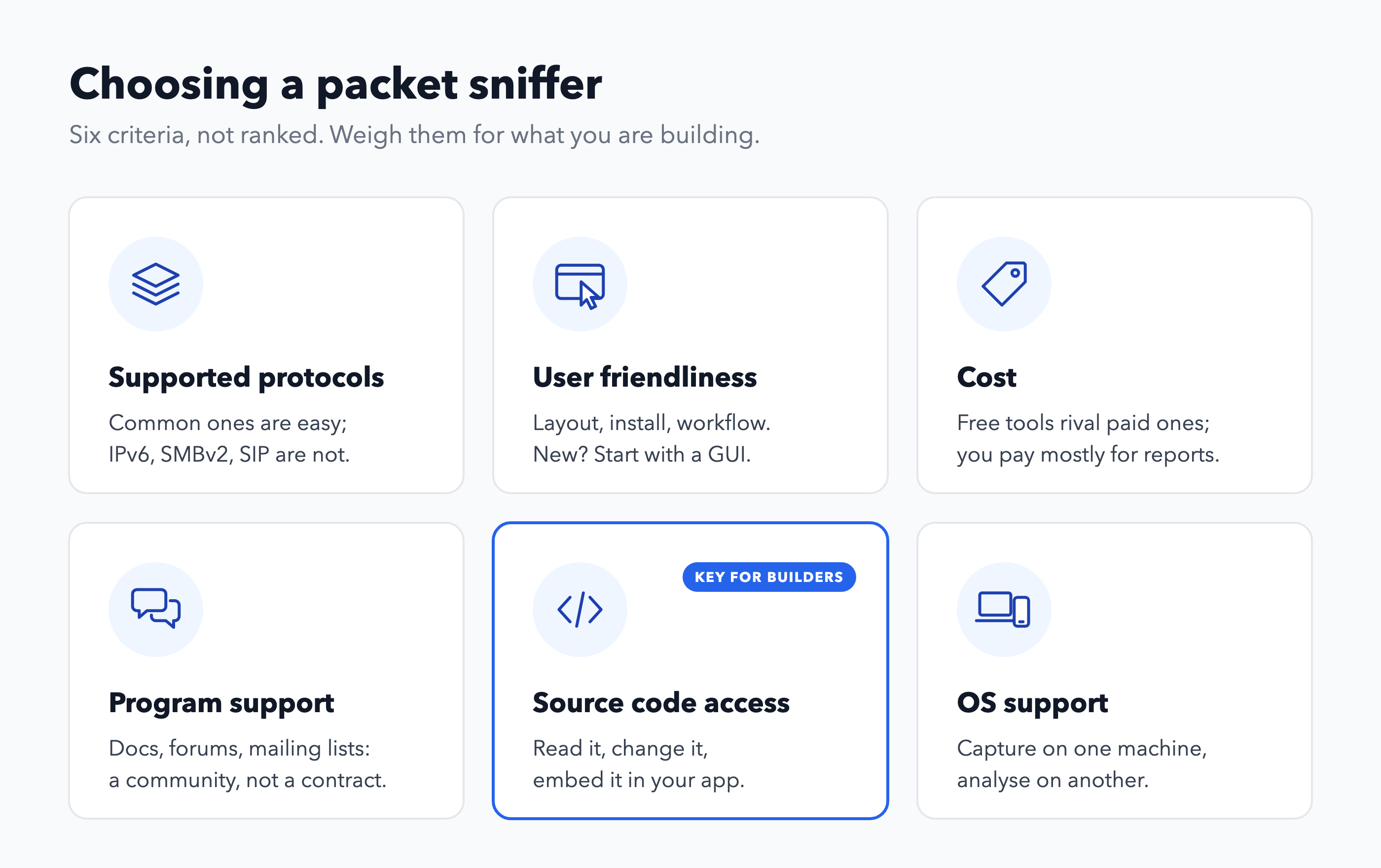
I originally wrote down only "supported protocols" — the obvious one. The book lists six, and they're not ranked, which matters:
- Supported protocols. Most sniffers handle IPv4, ICMP, TCP, UDP, DNS, HTTP. Newer things — IPv6, SMBv2, SIP — are where they fall down.
- User friendliness. Layout, install effort, workflow. If you're new to this, stay away from command-line tools for now.
- Cost. Free tools genuinely rival commercial ones. What you pay for in commercial products is mostly reporting.
- Program support. Docs, forums, mailing lists. Free tools rarely come with a support contract — they come with a community.
- Source code access. Open source means you can read it and change it. This one decided my architecture: if I'm embedding a capture engine in an app, this isn't a nice-to-have.
- Operating system support. You'll often capture on one machine and analyse on another. Plan for that split.
That last point about source code is, in my opinion, the most underrated line in the chapter for anyone building a product rather than troubleshooting a network.
How a sniffer actually works — the mental model I keep using
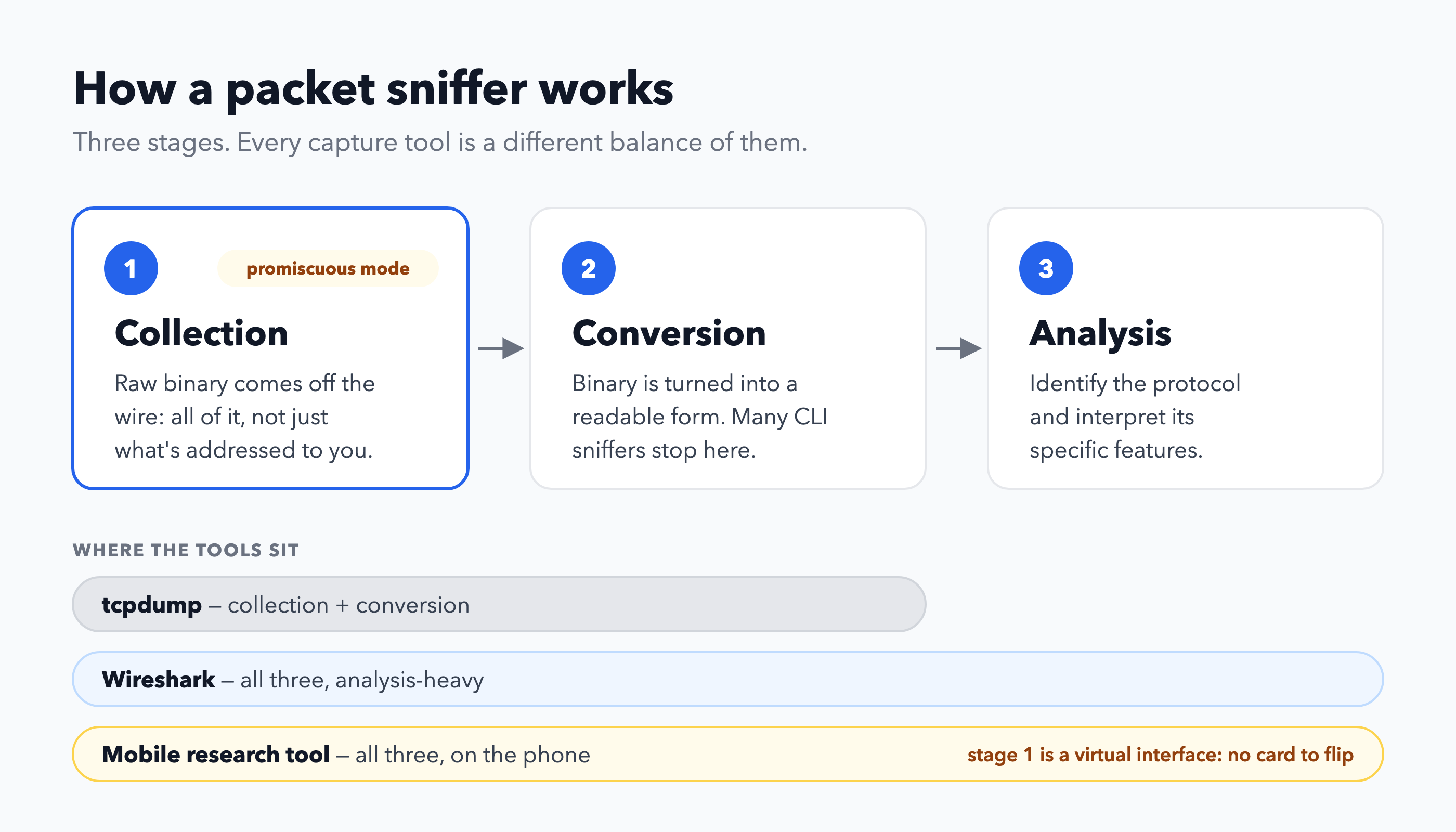
Three stages, and only one of them is hard:
- Collection. Raw binary data comes off the wire. Usually this means putting the network card into promiscuous mode, so it hands up all traffic on the segment, not just traffic addressed to it.
- Conversion. The binary is turned into something readable. Most advanced command-line sniffers stop here and leave the analysis to you.
- Analysis. The sniffer identifies the protocol and interprets its specific features.
The reason this model stuck with me: every capture tool you'll ever use is just a different balance of those three stages. Wireshark pushes stage 3 hard. tcpdump stops at stage 2. My mobile tool has to do all three on a phone, which is a very different engineering problem — and the reason is entirely about stage 1.
Promiscuous mode is the whole ballgame on mobile. On a phone you don't get a
network card to flip; you get a virtual interface. Android's VpnService hands you a
file descriptor of raw IP packets. That's a tap — but a very particular kind of tap,
and much later in the book Sanders explains exactly why placement decides what you
can see.
How computers actually talk
A network is a crowd of different systems and platforms. What they share is a set of common languages called protocols — TCP, IP, ARP, DHCP — and a group of protocols that work together is called a protocol stack.
The analogy in the book is the one I'd use with anyone: protocols are the grammar rules of human language. Every language has rules for conjugating verbs, greeting people, thanking someone. Protocols work the same way — they define how packets get routed, how a connection starts, how receipt is acknowledged.
Five questions almost every protocol answers
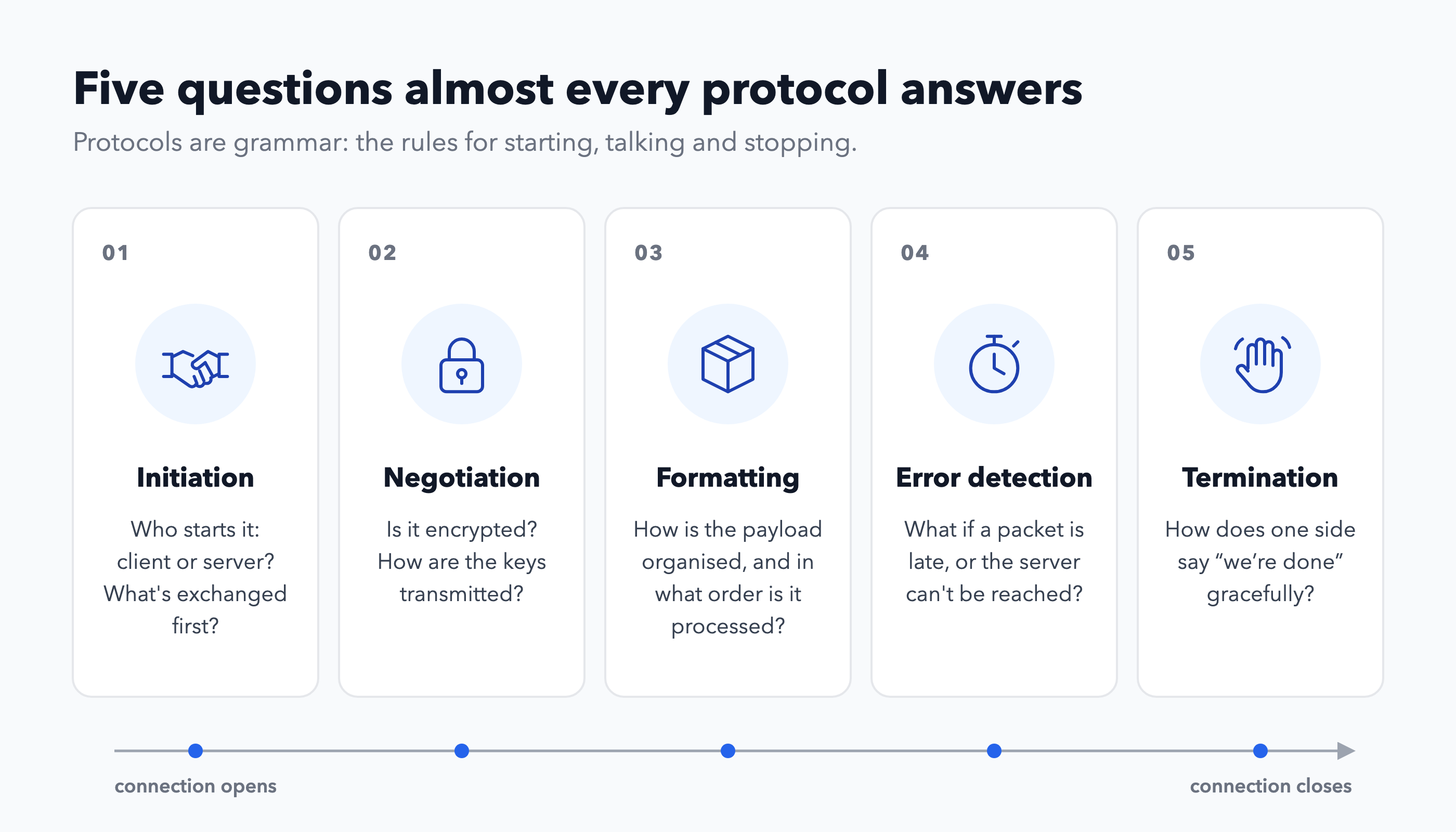
This list is the part of the chapter I've used most often since reading it:
- Connection initiation. Who starts it — client or server — and what has to be exchanged first?
- Negotiation of connection characteristics. Is the protocol encrypted? How are keys transmitted?
- Data formatting. How is the payload organised, and in what order is it processed?
- Error detection and correction. What happens when a packet is late, or when a client can't reach a server at all?
- Connection termination. How does one side say "we're done" gracefully?
Notice that the encryption question lives inside protocol design, not beside it. That's why "just don't encrypt it" was never an option, and why the interesting questions are all about what's left visible once encryption is on.
The OSI model, in the least boring way I can manage
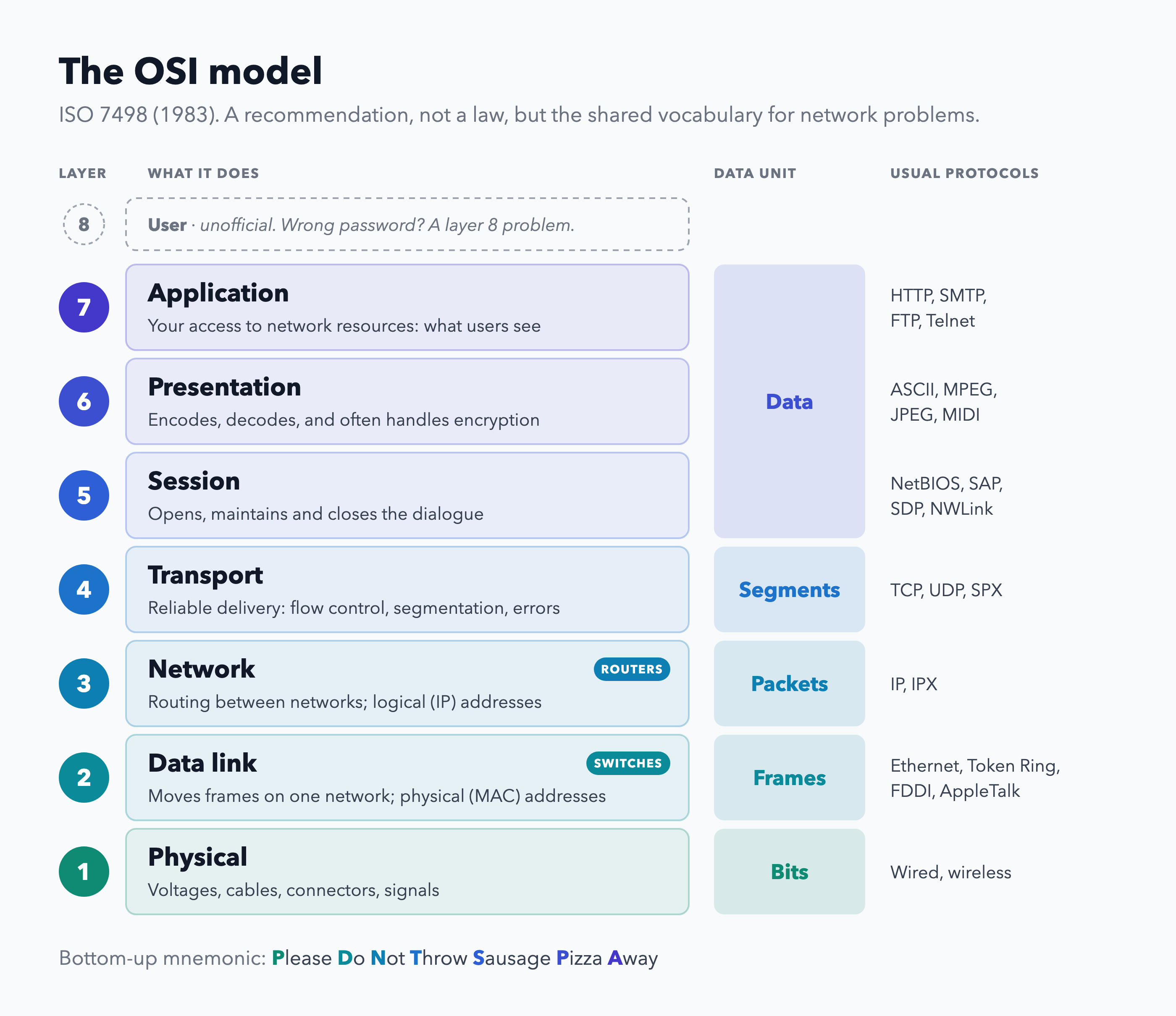
The OSI model is a seven-layer reference model published by ISO in 1983 as document ISO 7498. Protocols are separated by function, layer by layer.
Crucially: it is a recommendation, not a law. Nobody is required to follow it. The TCP/IP (DoD) model is a legitimate alternative. But you should know it cold, because — as the book puts it — it gives you a useful vocabulary for describing network problems.
Seven layers, top to bottom:
- 7 — Application. Your access to network resources. The only layer end users ever see.
- 6 — Presentation. Transforms data into something the application layer can read. Encoding, decoding, and a good deal of encryption handling.
- 5 — Session. Manages the dialogue between two machines — establishing it, keeping it, ending it, and deciding duplex versus half-duplex.
- 4 — Transport. Reliable delivery: flow control, segmentation, error control. Both connection-oriented and connectionless protocols live here.
- 3 — Network. The most complex layer. Routing between physical networks, and logical addressing of hosts — IP addresses. Routers live here.
- 2 — Data link. Transporting data across a physical network, with an addressing scheme for physical devices — MAC addresses. Switches live here.
- 1 — Physical. Voltages, cabling, connectors. Signal conversion between digital and analogue.
Mnemonic, if you need one: Please Do Not Throw Sausage Pizza Away.
And the joke worth knowing, because it explains half of all IT tickets: a user failing to log in because of a wrong password is a layer 8 problem. Layer 8 is the unofficial user layer.
The vocabularies each layer carries
Two details from around this part of the chapter that are easy to skim past and worth keeping:
Each layer has a name for the data it handles. The application, presentation and session layers just call it data. The transport layer calls it segments, the network layer packets, the data link layer frames, and the physical layer bits. This comes straight off the figure in the book, and it's the vocabulary everyone else assumes you have.
Each layer has its usual suspects. Application: HTTP, SMTP, FTP, Telnet. Presentation: ASCII, MPEG, JPEG, MIDI. Session: NetBIOS, SAP, SDP, NWLink. Transport: TCP, UDP, SPX. Network: IP, IPX. Data link: Ethernet, Token Ring, FDDI, AppleTalk. Physical: wired, wireless.
Why any of this matters if you're building something
Here's where my own project reframed the chapter.
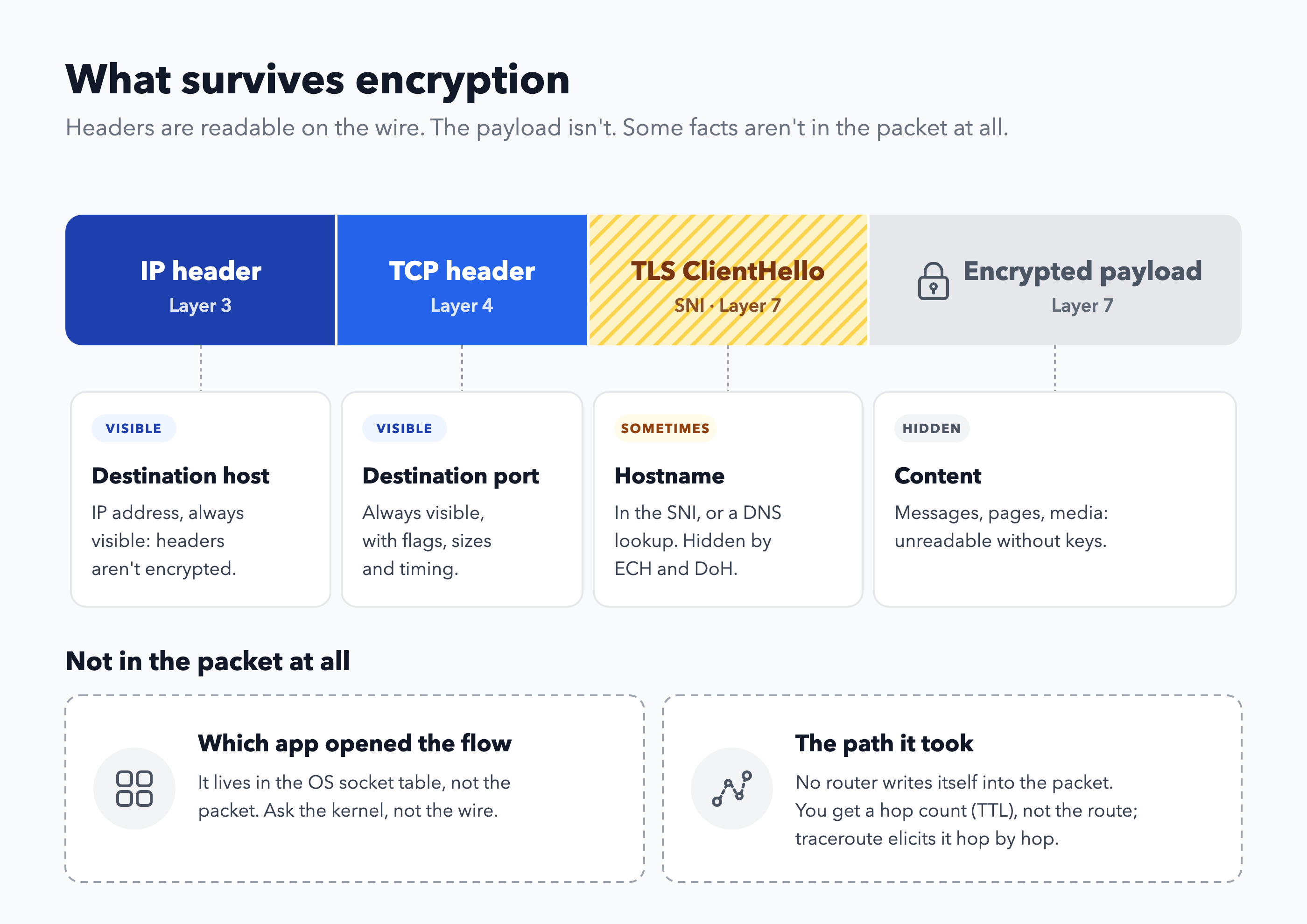
If you're building anything that observes mobile traffic, the OSI model stops being an exam topic and becomes a map of what you're allowed to know.
- Destination host lives at layer 3 — the IP address. Always visible. Headers are never encrypted.
- Destination port lives at layer 4. Always visible.
- Destination hostname lives at layer 7 — in DNS, or in the TLS SNI. Visible sometimes: DNS-over-HTTPS hides the first, and Encrypted Client Hello hides the second.
- Which app opened the connection is layer 7 too — but it isn't in the packet at all. It lives in the operating system's socket table. You need the OS, not the wire.
- The path the packet took — the actual chain of routers — is not in the headers at all. No router writes itself into the packet. All you get is the TTL, which tells you how many hops remain, not which ones.
That last line is the one I wish someone had told me a year ago. No amount of packet analysis will tell you which app a flow belongs to. That's not a limitation of your tooling — it's a category difference between what's on the wire and what's in the kernel.
The path is a different kind of absence. You can't read it, but you can ask for
it: traceroute sends packets with TTL 1, 2, 3 …, collects the ICMP "time
exceeded" reply from each router in turn, and thereby discovers the route one hop at
a time. The path isn't observed — it's elicited. Which means if your tap is
passive, you get hop counts for free and the route not at all.
And it's why the OSI model is worth memorising even though it's "just a recommendation". It tells you, before you write a line of code, which questions are answerable at layer 3 and which need a completely different source.
So how do you actually build the thing? Two modules, not one
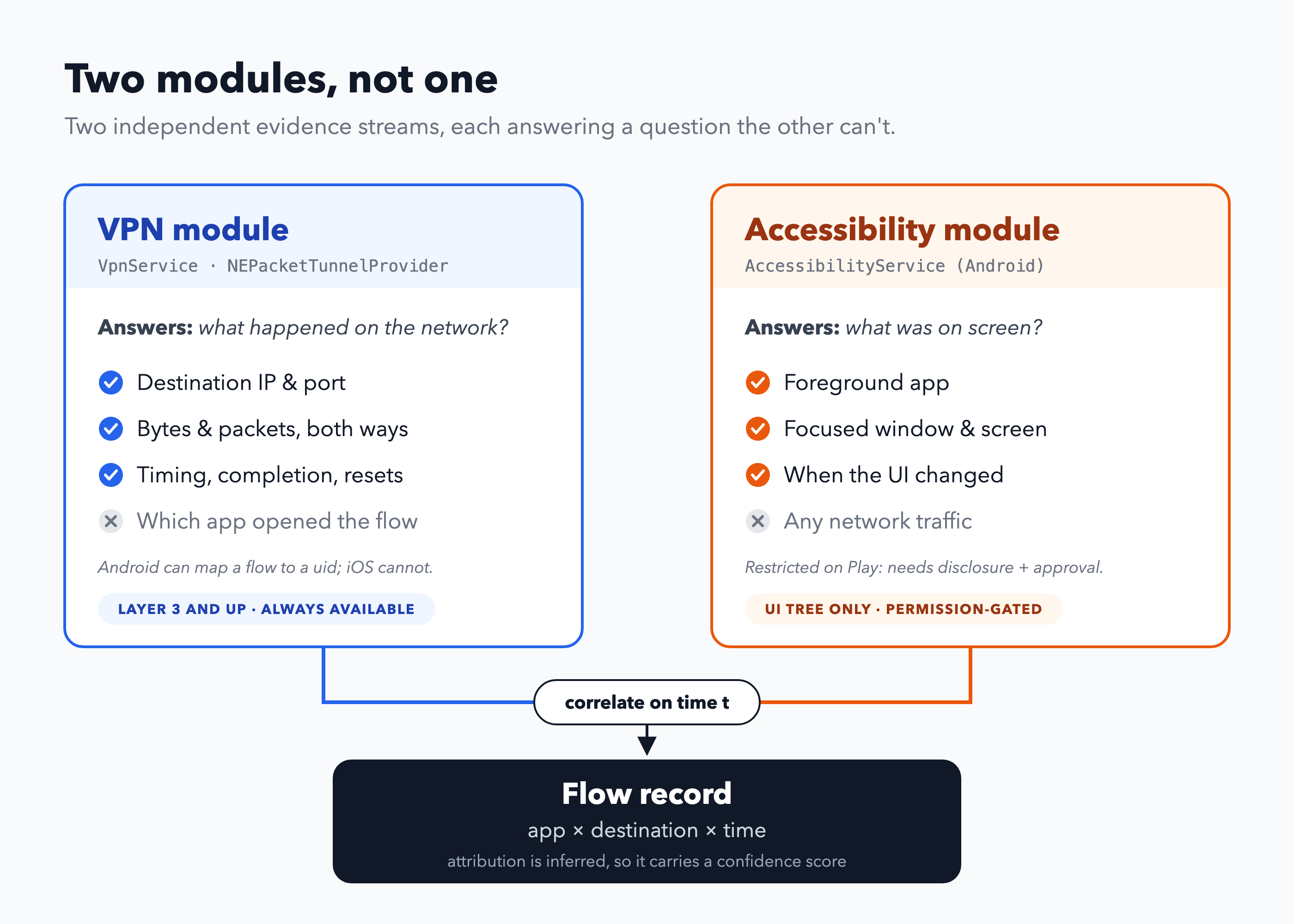
This is the question I get asked most, and it's the one I got wrong at first. The temptation is to think of the VPN as the capture component and the accessibility API as a helper. That's backwards. They are two independent evidence streams that answer two different questions, and neither can answer the other's.
Module 1 — the VPN: what happened on the network
On Android, a VpnService hands you a file descriptor of raw IP packets. On iOS,
NEPacketTunnelProvider gives you a packetFlow and a virtual interface. In both
cases you get layer 3 and above, and nothing below — the interface literally
starts at IP headers.
This module can tell you, with certainty:
- the destination IP and port of every flow,
- byte and packet counts in both directions,
- timings — start, end, inter-arrival,
- whether a connection completed or was reset.
It cannot tell you which app opened the flow. That information never enters the packet.
One detail worth knowing before you design around this: on Android the platform does
give you a bridge — ConnectivityManager.getConnectionOwnerUid() maps a live
connection to the uid that owns it, and it works precisely because you are the
active VpnService. But it's Android-only. iOS has no equivalent from inside the
tunnel.
Module 2 — accessibility: what was on screen
This is where the reframe matters. The accessibility API is not a network API.
It exposes the UI tree — which app is in the foreground, what window is focused,
what's rendered. On Android, AccessibilityService gives you getRootInActiveWindow(),
the window list, and AccessibilityEvent.getPackageName() on every UI event. On iOS
the equivalent surface is more restricted, but the category is the same.
So: the accessibility module gives you the app label and the moment in time; the VPN module gives you the flow in that same moment.
That's the join. Not "accessibility tells me which app owns this packet" — it can't
— but "accessibility tells me which app was frontmost at t, and I correlate that
with the flow active at t."
| Question | VPN module | Accessibility module |
|---|---|---|
| What IP and port was contacted? | ✅ | ❌ |
| How many bytes, over what duration? | ✅ | ❌ |
| Did the connection succeed? | ✅ | ❌ |
| Which app is in the foreground? | ❌ | ✅ |
| Which screen / context was active? | ❌ | ✅ |
| Which app opened this specific flow? | partial (uid, Android only) | inferred by correlation |
Three design consequences
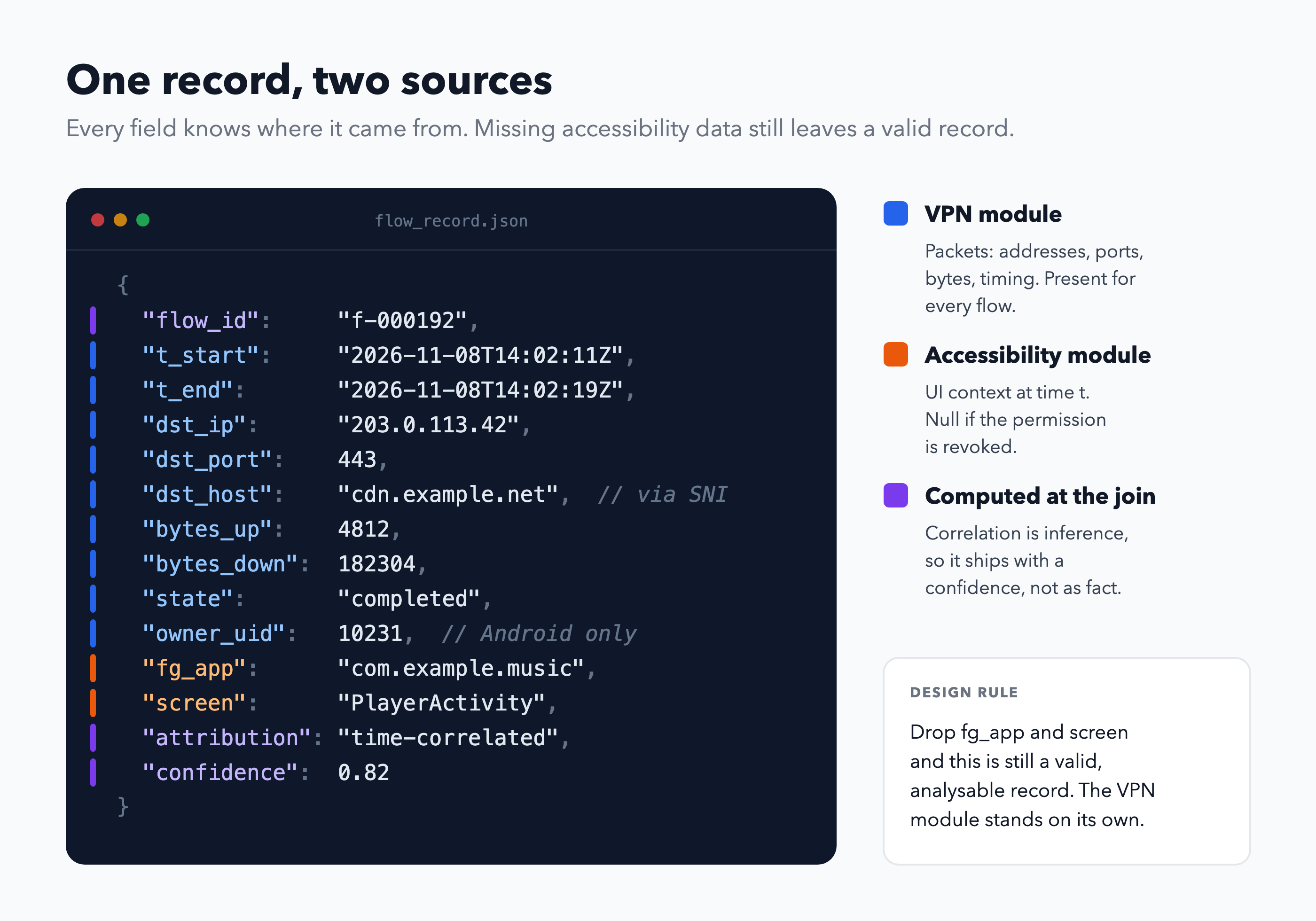
1. Correlation is inference, not proof. If two apps are active in the same second — a music player and a messaging app — a time-based join can misattribute a flow. Report it as confidence, not as fact. This is the single biggest threat to validity in the whole design, and it should be in your methods section, not buried.
2. The accessibility module is fragile by design. Google Play restricts
AccessibilityService to assistive use; anything else needs a prominent disclosure
and, since Android 12, an approved Permission Declaration Form. For a consented
research panel with signed agreements this is a manageable process, not a wall — but
it is a process, and it constrains both distribution and update cadence.
3. Keep the two modules independently useful. The VPN module should produce a complete, valid record even when accessibility data is missing. If your analysis collapses because a permission was revoked, the design is wrong.
What this buys you over desktop GESIS Surf
GESIS Surf sees a page because the browser tells it. The mobile tool can't — but it sees something the desktop tool never could: cross-app behaviour. Not "which page did they read", but "which app talked to which host, how much, and when" — across the whole device, without instrumentation inside each app.
That's a different research object, not a degraded version of the same one. It also means the privacy story has to be correspondingly stronger: opt-in, per-app allow lists, on-device minimisation, and no payload content at all.
Where I'm going next
Chapter 1 gave me the vocabulary. Chapter 2 — Tapping into the Wire — is where it gets concrete: hubs, switches, port mirroring, taps, ARP cache poisoning, and, finally, sniffer placement in practice.
That's the chapter that will decide the architecture of my mobile tool, because a phone is a very specific place to put a tap — and it changes what "the wire" even means.
If you're building anything that touches network data, my advice from seven pages in: read the model before you read the API docs. The APIs change every release. The layers don't.
Next in this series: Chapter 2 — Tapping into the Wire, and what changes when the tap is inside the device instead of on the cable.
Reference
Ramirez, M. A., Mangold, F., & Stier, S. (2026). GESIS Surf: An Open-Source Infrastructure for Privacy-Preserving Longitudinal Web Browsing Data Collection. arXiv:2610.41441. https://arxiv.org/abs/2610.41441
Sanders, C. (2017). Practical Packet Analysis: Using Wireshark to Solve Real-World Network Problems (3rd ed.). No Starch Press. Chapter 1, pp. 1–16.